SIPL / THE PROGRAMMING LANGUAGE

Write
what comes next.
Our programming language for useful tools, enterprise programs, and games. From a small idea to something you use every day—SIPL gives it a place to start.
See what SIPL can build.
Explore 35 programs, from creative studios and business tools to original games. Each has a description and a screenshot where available. Browse the programs →
MEET SIPL TOOLKIT
A workspace for your next idea.
SIPL Toolkit is the native editor and workbench for building with SIPL, written in SIPL itself. Your project files, tabbed editor, Run and Build controls, and Output panel live together in one window, so you can move from an idea to a working program without juggling separate tools.
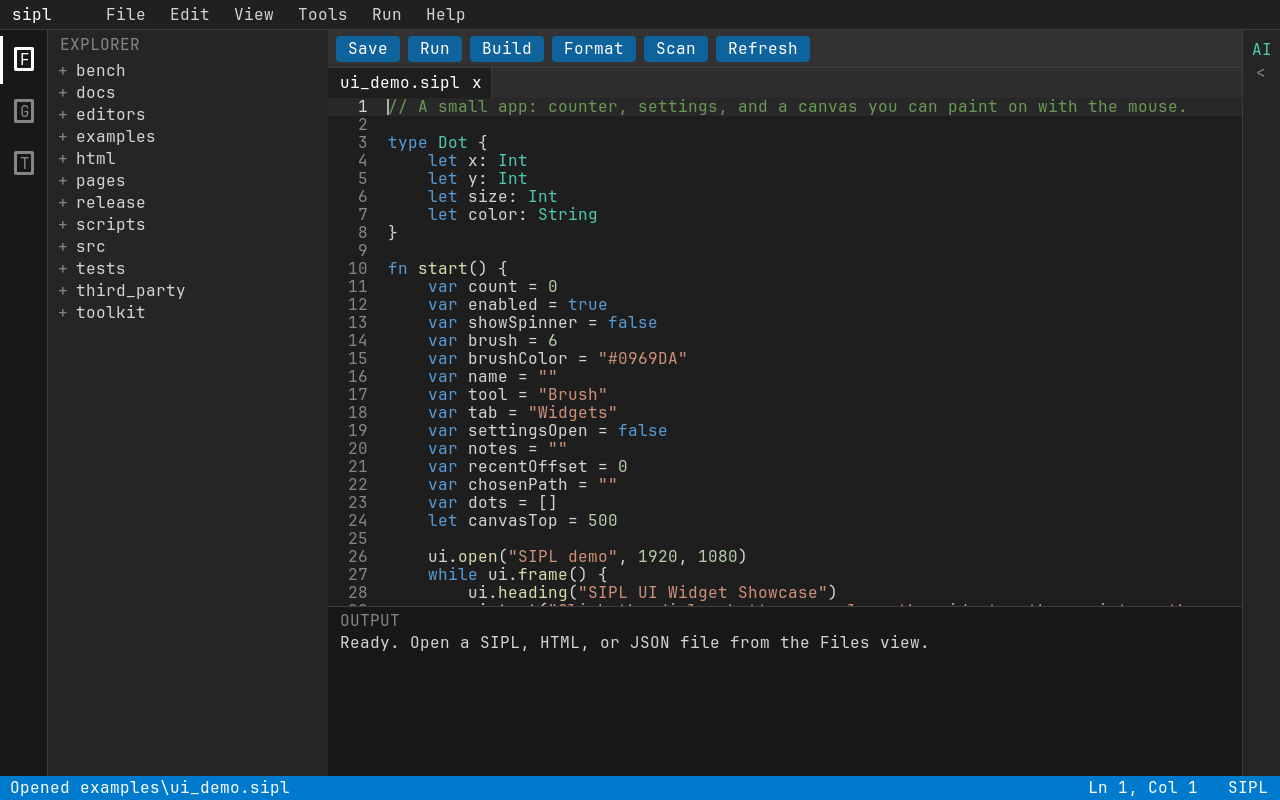
Open a project. Launch the Toolkit with the folder you want to work in, or start with one of the example projects. Expand folders in the Files Explorer and select a file to open it in a tab. Keep related source and media together in that workspace. HTML and JSON files can be edited too; images, videos, and supported 3D models open in read-only preview tabs.
Edit, save, and run. Syntax highlighting and IntelliSense help you find names, functions, and useful completions as you type. Press Ctrl+Space to request suggestions, use the arrow keys to choose one, and accept it with Tab or Enter. Save with the toolbar or Ctrl+S, then run the active SIPL program with Run or Ctrl+R. Read the Output panel to see what happened.
Check and build. Use Scan to check for compiler errors and inspect the marked error lines. Format helps keep your source consistent. Make a small change, save, run again, and check the result before moving on. When the program is ready, Build packages the active SIPL program into an executable. The SIPL documentation explains the language and runtime behind the tools.